AI Refinery Runtime
How to onboard and package agents for the AI Refinery runtime in Agent Gallery.
This page extends the Onboard an Agent guide and focuses on the AI Refinery Runtime. It covers two core workflows:
- YAML-based configuration support — how runtime settings are supplied via a YAML file (building on the approach shown in Onboard an Agent). If you're just using AI Refinery built-in agents, Trusted Agent Huddle Agents (TAH), MCP Agents and A2A agents this workflow will suffice.
- Packaging and uploading a ZIP with source — how to ship a runnable service with
main.py, an updatedDockerfile, and the runtime descriptoragent_gallery.yaml. If you have custom agents with custom python code, this workflow will allow you to ship your custom agentic AI Refinery deployments.
Login required
Adding an agent requires you to be logged in to the gallery. Refer to Logging In to Agent Gallery if you need to authenticate.
1. YAML support in AI Refinery Runtime
The AI Refinery Runtime accepts a YAML configuration that describes the agent topology and execution flow (orchestrator, super/utility agents). In the onboarding flow you previously saw an example where you saved a flow_config.yaml and uploaded it under Edit → Runtime.
In brief:
- Prepare a YAML file describing your agent graph (orchestrator, super agents, utility agents, TAH, MCP or A2A agents).
- In the Agent Gallery, go to Edit → Runtime for your agent and upload the YAML to apply the configuration.
- Save your changes, then Run the agent as usual.
Visit the SDK repository for more information on how to create agents with the AI Refinery.
Accenture/airefinery-sdk
56
2. Build & upload a ZIP with source
In addition to YAML-based configuration, the AI Refinery Runtime can run your packaged source as a containerized service. This is useful when you're building complex custom agents.
You’ll upload a ZIP that includes the runtime manifest plus your app code. The three key files you must include are:
agent_gallery.yaml— declares runtime, start command/port, and config schema expected by the gallery UI.Dockerfile— builds a minimal image, installs deps, and startsuvicornon port 7070.main.py— FastAPI app exposing the correct endpoints for querying the agent via SSE.
A minimal project layout (before zipping) looks like this:
You can checkout this repository for a working base template (as shown below) for custom agents.
agent_gallery.yaml (runtime manifest)
version: 1
runtime: "ai_refinery"
start:
  command: ["uvicorn", "main:app", "--host", "0.0.0.0", "--port", "7070"]
  port: 7070
  configSchema:
    properties:
      apiKey:
        type: "string"
        env_variable_name: "API_KEY"
        description: "Your AI Refinery API key"
        required: true
        mask: true
What this does
- Declares
runtime: "ai_refinery". - Specifies how to start your server (
uvicorn main:app …) and which port it binds to (7070). - Defines a small
configSchemafor inputs such asapiKey, surfaced in the gallery UI when someone runs the agent.
Updated Dockerfile
# Use a slim Python base image for a smaller final image size
FROM python:3.12-slim-bookworm

# Set the working directory inside the container
WORKDIR /app

# Copy the rest of your application's code into the container
COPY . .

# Install the Python dependencies
RUN pip install --no-cache-dir -r requirements.txt

# Expose the port that the application will run on
EXPOSE 7070

# The command to run the uvicorn server for your main.py file
CMD ["uvicorn", "main:app", "--host", "0.0.0.0", "--port", "7070"]
What this does
- Uses a slim Python base for smaller images.
- Copies code, installs from
requirements.txt, exposes port 7070, and launchesuvicornto servemain.py.
main.py with query endpoints
import os
import uuid
import json
from fastapi import FastAPI, Request
from fastapi.responses import StreamingResponse
from pydantic import BaseModel
from dotenv import load_dotenv

# --- Custom Agent Imports ---
from air import DistillerClient
from custom import executor_dict # Import the agent logic

# --- Initial Setup ---
load_dotenv()
api_key = str(os.getenv("API_KEY"))
project_name = "recommender_project"

# Initialize the Distiller Client and create the project on startup
print(f"Initializing DistillerClient for project: {project_name}")
distiller_client = DistillerClient(api_key=api_key)
# It's better to ensure the project exists rather than creating it on every startup
# In a production scenario, project creation would be a separate, one-time step.
try:
    distiller_client.create_project(config_path="config.yaml", project=project_name)
    print(f"Project '{project_name}' created or already exists.")
except Exception as e:
    # Handle cases where the project might already exist gracefully
    if "already exists" in str(e):
        print(f"Project '{project_name}' already exists.")
    else:
        print(f"An error occurred during project setup: {e}")
        raise

# --- FastAPI Application ---
app = FastAPI(
    title="Custom Agent Server",
    description="A FastAPI server to interact with the Recommender AIR agent via SSE.",
)

# --- Pydantic Models for Request Bodies ---
class QueryRequest(BaseModel):
    """Defines the body for sending a query to the agent."""
    query: str

# --- API Endpoints ---
@app.post("/agent/query")
async def agent_query_stream(request: Request, body: QueryRequest):
    """
    Accepts a query and streams responses from the Recommender agent via SSE.

    - **query**: The natural language query to send to the agent.
    """

    async def event_generator():
        """
        The async generator that handles the agent query and yields SSE events.
        """
        user_id = f"user-{uuid.uuid4()}"

        try:
            # Yield status updates in SSE format
            yield f"event: status\ndata: {json.dumps(f'Connecting to project {project_name} for user {user_id}...')}\n\n"

            # Use the async context manager for the DistillerClient
            async with distiller_client(
                project=project_name,
                uuid=user_id,
                executor_dict=executor_dict
            ) as dc:

                yield f"event: status\ndata: {json.dumps('Connection successful. Sending query...')}\n\n"

                # Send the query to the agent
                responses = await dc.query(query=body.query)

                # Stream responses back to the client
                async for response in responses:
                    if await request.is_disconnected():
                        print("Client disconnected, stopping stream.")
                        break

                    # Serialize the Pydantic object to JSON and format as a valid SSE message
                    yield f"event: message\ndata: {response.model_dump_json()}\n\n"

            yield f"event: close\ndata: {json.dumps('Stream finished.')}\n\n"
        except Exception as e:
            print(f"An error occurred during query stream: {e}")
            import traceback
            traceback.print_exc()
            error_message = f"An unexpected server error occurred: {type(e).__name__}"
            # Yield the error message in SSE format
            yield f"event: error\ndata: {json.dumps(error_message)}\n\n"

    return StreamingResponse(event_generator(), media_type="text/event-stream")

@app.get("/")
def read_root():
    """A simple root endpoint to confirm the server is running."""
    return {
        "message": f"Custom Agent Server is running. Loaded project: '{project_name}'. POST to /agent/query to interact."
    }
Endpoints & behavior
POST /agent/query— accepts{"query": "<natural language>"}and streams Server‑Sent Events (SSE) back to the caller as your agent works through the request (status, message, close/error events).GET /— simple health/readiness endpoint confirming the server is loaded and which project is active.
Custom Agents, Project YAML and requirements
From the main.py we import a custom agent which we have defined in custom.py as shown below. This is a simple template / boilerplate agent which internally just makes an LLM call with the input query to this agent and sends the output completion as its output.
import os
from air import AsyncAIRefinery
from dotenv import load_dotenv

# Load environment variables from a .env file
load_dotenv()
api_key = str(os.getenv("API_KEY"))

async def recommender_agent(query: str) -> str:
    """
    A custom agent that provides recommendations based on a user query.

    Args:
        query: The user's request for a recommendation.

    Returns:
        A string containing the recommendation and a justification.
    """
    prompt = """Given the query below, your task is to provide the user with a useful and cool
       recommendation followed by a one-sentence justification.\n\nQUERY: {query}"""

    formatted_prompt = prompt.format(query=query)

    # Initialize the AIRefinery client to interact with the LLM
    airefinery_client = AsyncAIRefinery(api_key=api_key)

    # Call the chat completions API
    response = await airefinery_client.chat.completions.create(
        messages=[{"role": "user", "content": formatted_prompt}],
        model="meta-llama/Llama-3.1-70B-Instruct",
    )

    return response.choices[0].message.content

# This dictionary maps the agent name from config.yaml to its function
executor_dict = {"Recommender Agent": recommender_agent}
We also need to include a project YAML to configure the agentic workflow. Here we define the most basic Orchestrator → CustomAgent (a utility agent in this case) workflow.
utility_agents:
  - agent_class: CustomAgent
    agent_name: "Recommender Agent"
    agent_description: |
      The Recommender Agent is a specialist in item recommendations. For instance,
      it can provide users with costume recommendations, items to purchase, food,
      decorations, and so on.
    config: {}

super_agents: []

orchestrator:
  agent_list:
    - agent_name: "Recommender Agent"
The requirements.txt minimally requires the AI Refinery SDK and the FastAPI server.
airefinery-sdk==1.21.0
fastapi==0.119.1
Build the ZIP
-
Ensure
requirements.txtis present and accurate (e.g.,fastapi,uvicorn, and anyair/custom agent deps). -
Verify
main.pyimports resolve in your container (e.g.,air.DistillerClient,auth.base_url,auth.project_name, andcustom_agents.executor_dict). -
Zip the folder contents (from inside the project dir):
zip -r project.zip .On macOS Finder, right‑click the folder → Compress; on Linux/WSL, use the shell command above.
Upload to Agent Gallery
- In Agent Gallery, choose Add Agent and select the AI Refinery runtime.

- Verify the agent is created and available from the Edit view.
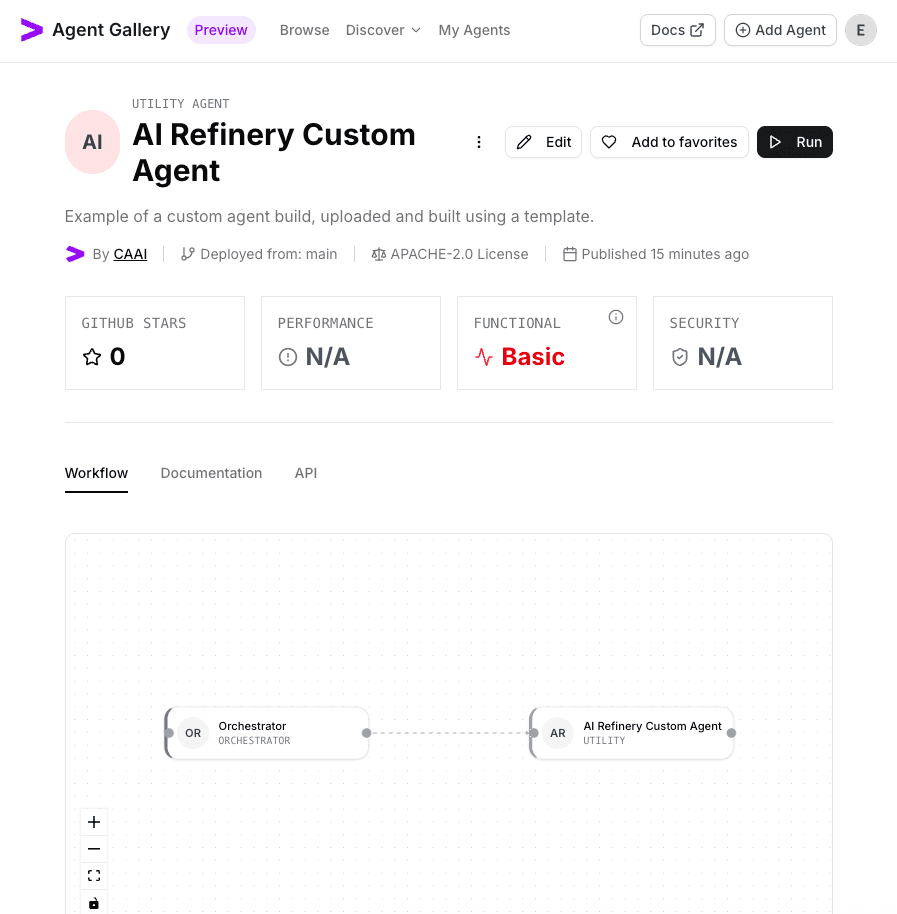
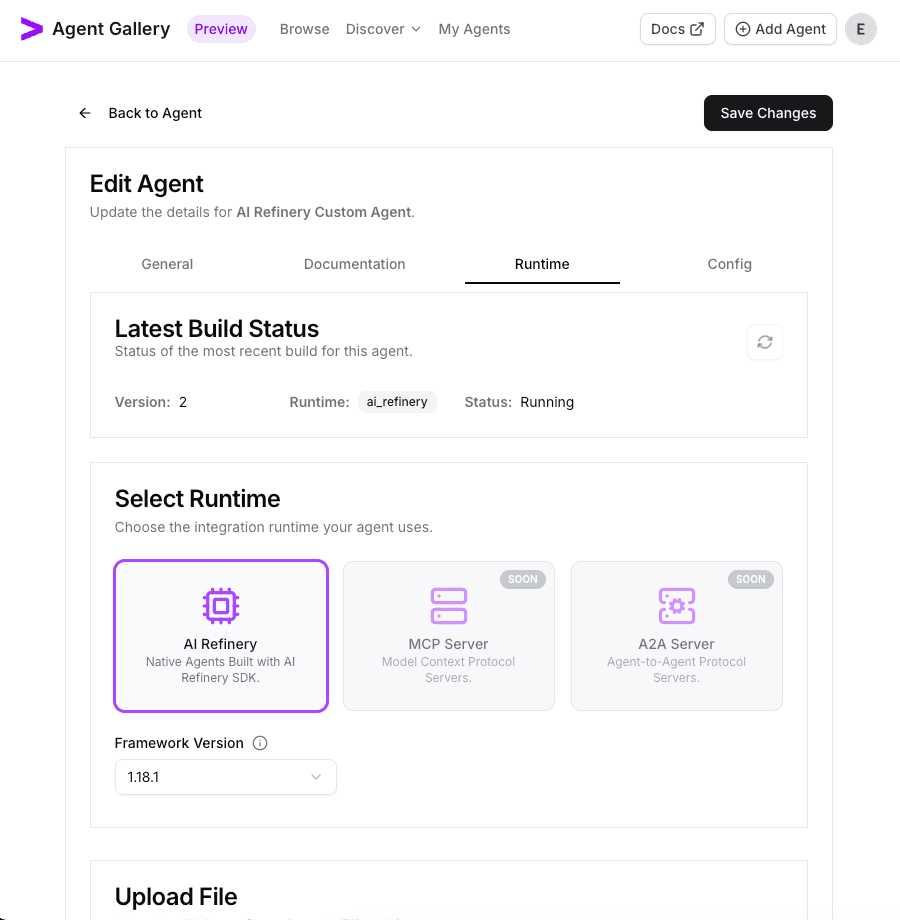
- Open Edit → Runtime, choose Upload ZIP, and select the
project.zip(screenshot names as air-custom-agent-starter.zip) bundle you created earlier.
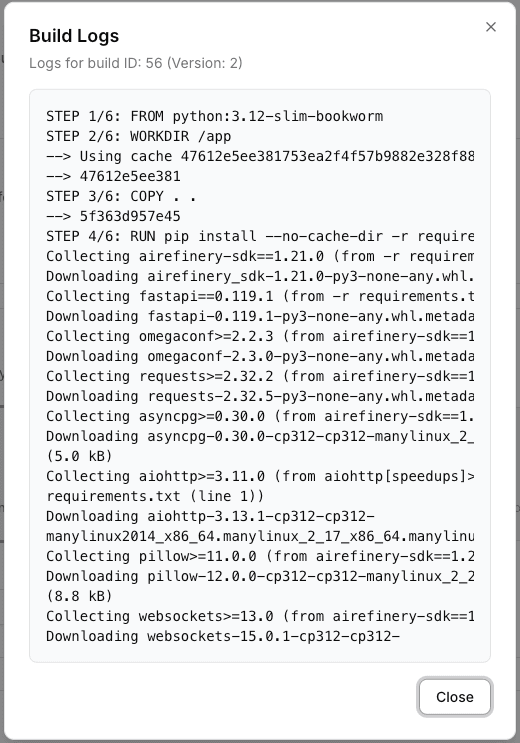
- Watch the build kick off and wait for the container build to finish. The refresh button spins while the build is running.

- Review the build logs if you need deeper troubleshooting details (i.e. if build fails).
- Once the build is successful, the runtime auto-populates any config schema defined in
agent_gallery.yaml.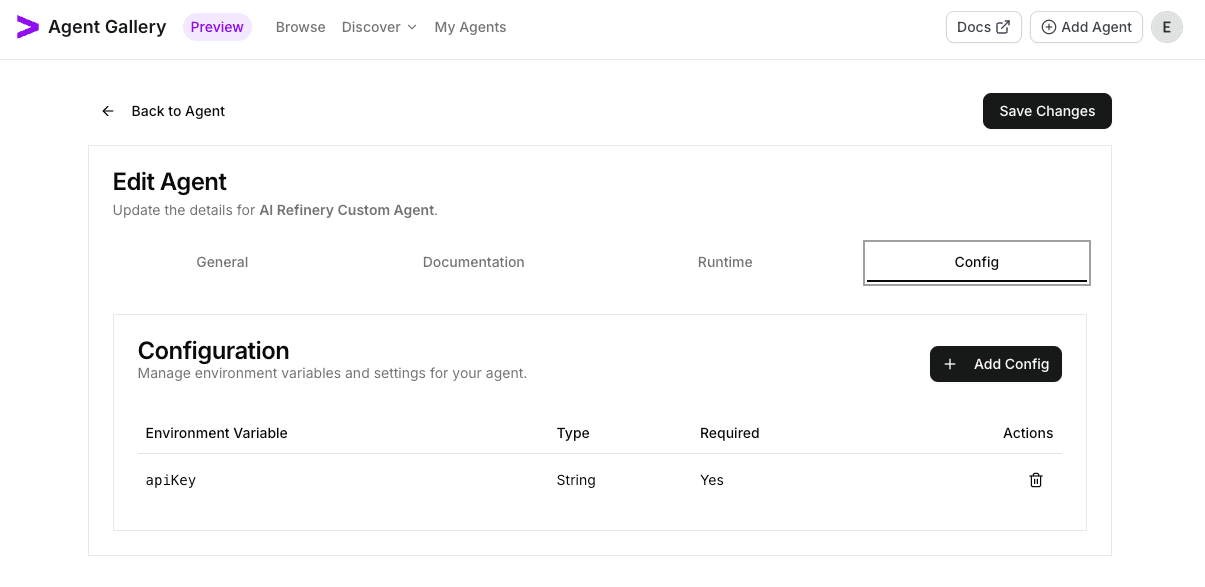
- Click Run to open the execution dialog and provide required runtime inputs (e.g.,
apiKey).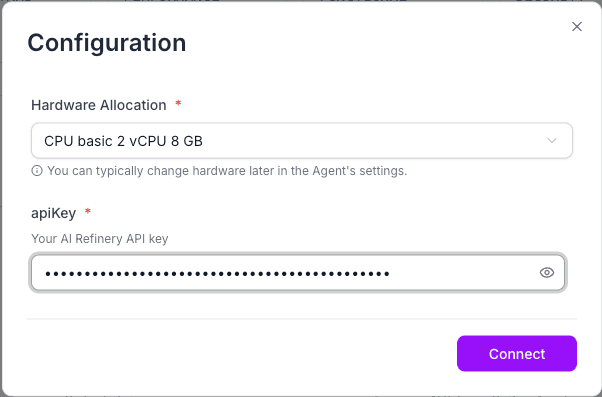
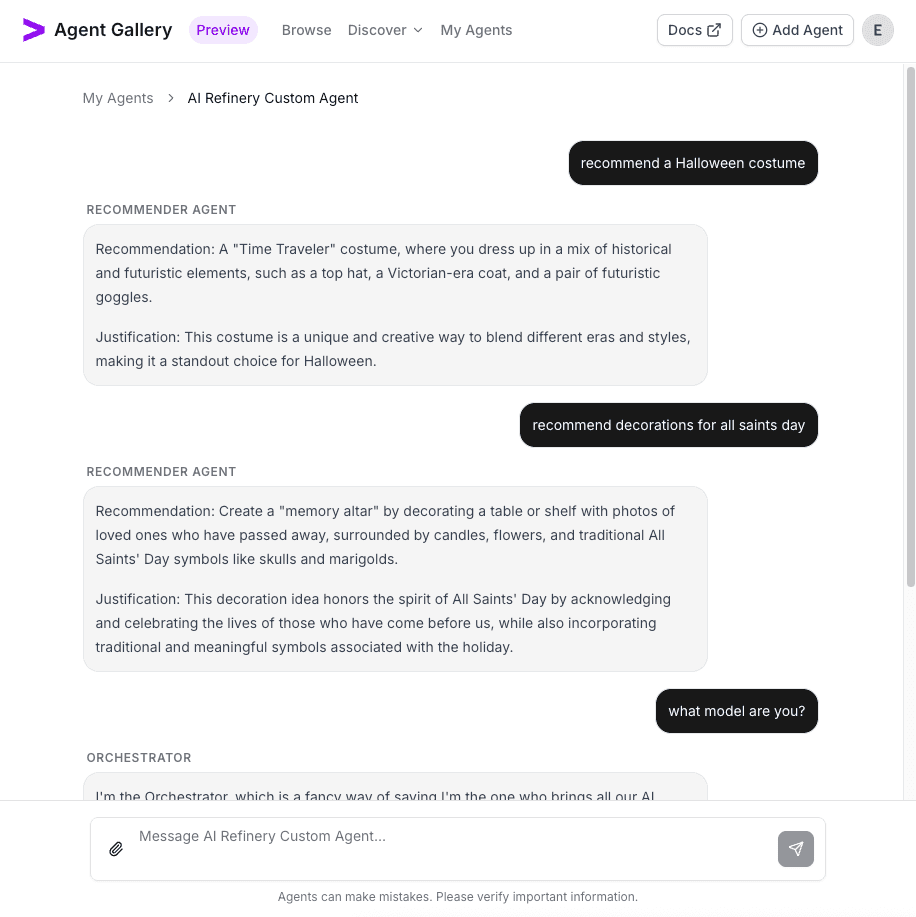
- Submit a query and confirm responses stream back from your packaged agent.
Troubleshooting checklist
- Port mismatch: Port in
agent_gallery.yamlmust matchEXPOSEin Dockerfile and theuvicorn --portvalue. - Missing deps: If the container can’t import
fastapior your agent code, confirmrequirements.txtis included and installed. - Environment variables:
API_KEYis required. Ensure you have the AI Refinery API key.
Onboard an Agent
Step-by-step walkthrough for publishing and validating a Flow super agent in the Agent Gallery.
Example: Setup and Test a Vision Team
End-to-end walkthrough for provisioning a multimodal Vision Team, uploading its flow, and validating image understanding and generation inside the Agent Gallery.